1. 流式计算和批计算
1.1. 流式计算
流式计算是持续地从数据源获取数据,并实时地对数据进行处理和分析。
1.1.1. 特点
- 实时性强,能够在数据到达时立即进行处理。
- 数据无边界,是持续产生的
- 计算模型有状态,需要维护中间状态,一般用增量计算代替全量计算
- 时延敏感,需要低延迟处理。
1.1.2. 应用场景
- 实时监控和异常检测(如网络流量监控、安全威胁检测等)
- 实时数据分析(如实时点击流分析、用户行为分析等)
- 实时决策和推荐(如实时定价、个性化推荐等)
1.2. 批计算
以离线的方式,周期性地从数据源根据过滤条件获取数据集,并对整个数据集进行处理和分析。
1.2.1. 特点
- 数据集有边界,一般是静态的
- 计算模型无状态,不需要维护中间状态,一般采用全量计算
- 延迟不敏感,但处理吞吐量大
1.2.2. 应用场景
- 离线数据分析(如用户画像)
- 大规模数据处理(如网页索引、推荐系统构建等)
- 机器学习模型训练和评估
2. kafka stream
常见的流式处理框架有flink和storm等,相比如这些专业的流失处理框架,kafka stream的一个最大优点是非常轻量,kafka Streams利用kafka作为数据源,其本身仅仅是kafka的一个客户端库,它可以像其他普通的Kafka消费者客户端一样,通过标准的kafka协议与broker进行交互。kafka streams实时消费上游的topic,经过自定义的计算,将结果生产到下游的topic,理论上你可以自己写调用Producer api和Consumer api来实现一个流计算应用。
2.1. 关键特性
- 时间的定义:生成时间、处理时间、事件时间
- 时间窗口:sliding window、hopping window、event window
- 处理晚到数据
- map-reduce
- table join
- 中间状态
- exactly-once
2.2. 计算模型
KStream和KTable则是Kafka Stream库在客户端对数据流进行各种转换操作时使用的抽象模型
KStream代表了一个无界的持续更新的记录流,用于表示和处理有序的、不断插入的事件序列KTable是持久化状态存储,用于表示记录对连续数据流执行计算后持久化存储的结果视图
2.3. 存储模型
2.3.1. KTable
Kafka Stream可以为每个流任务嵌入一个或多个本地状态存储KTable,并且允许开发者通过API的方式进行访问、查询所需要处理的数据。这些状态数据底层默认是基于RocksDB数据库实现的,本质其实是在内存的一个hashmap。 而且状态存储默认支持同步到远端的kafka broker,以topic的方式记录本地存储的changelog。 当kafka streams的task因重建或者动态扩缩容而发生迁移时,若迁移后的kafka streams实例无法从本地磁盘恢复状态,就会读取下changelog的topic来重建状态存储。具体的工作流程如下:
- 从变更日志恢复状态: 当Kafka Streams应用启动时,它首先检查本地状态存储。如果状态存储存在,它会检查最后处理的偏移量。
- 如果本地状态存储的数据是完整的,Kafka Streams会从本地状态存储恢复数据。
- 然后,从变更日志主题中读取从最后一个处理偏移量到当前最新偏移量之间的所有变更,并将这些变更应用到本地状态存储。
- 从检查点恢复进度: Kafka Streams还会从检查点恢复处理进度。检查点记录了每个分区的偏移量,即每个分区处理到哪一条记录。当应用程序重新启动时,它会从这些偏移量继续读取和处理记录。
- 保证数据一致性:
- Kafka Streams确保本地状态存储与变更日志主题中的数据一致。每次状态存储更新时,都会记录在变更日志中。
- 通过事务机制,Kafka Streams可以确保所有操作(读取、处理、写入)的一致性。即使在发生故障时,未完成的事务也会回滚,保证不会出现重复处理或数据丢失的情况。
2.3.2. GlobalKtable
KTable的数据是按主题分区的,每个流处理应用实例只处理其负责的partition的数据。globalKtable保存来自所有kafka stream client输出的ktable数据,相同key的情况下,kafka的顺序机制保证后写入的会覆盖之前写入的。
- 数据分布:
KTable:按分区处理,每个实例只处理分配给它的分区数据。GlobalKTable:全局处理,每个实例都有整个表的副本。
- 状态存储:
KTable:本地状态存储与分区数据相关。GlobalKTable:本地状态存储整个表的数据。
- 查询能力:
KTable:只能查询本地分区数据。GlobalKTable:可以查询整个表的数据。
- 使用场景:
KTable:适用于需要对分区数据进行处理和变换的场景。GlobalKTable:适用于需要全局状态访问的场景。优势globalKtable的数据在本地也会缓存,因此无法避免并发问题,并发场景下建议将数据存储到关系型数据库或redis等集中式仓库。
kafka streams:一款轻量级流式计算引擎 | 大飞哥的博客 (hustclf.github.io)
KafkaStream之时间窗口WindowBy_kafka steam windowedby 时间不准确-CSDN博客
2.4. 任务分配
由于kafka stream的数据来源是topic,因此kafka stream任务的分配也和partition的分配一样,kafka会将多个partition平均分配到多个节点上,如果kafka stream client的数量大于kafka stream partition,那么会存在某个client没有任务可以处理的情况。当kafka stream client动态增加会减少时,会出现tasks重新分配。tasks重新分配需要state store重建然后才能继续执行task, 重建state store会优先从本地磁盘恢复,若找不到本地磁盘信息则会通过远端kafka集群的备份topic来重建这些信息,可能会耗时较长。
2.5. 有向无环图
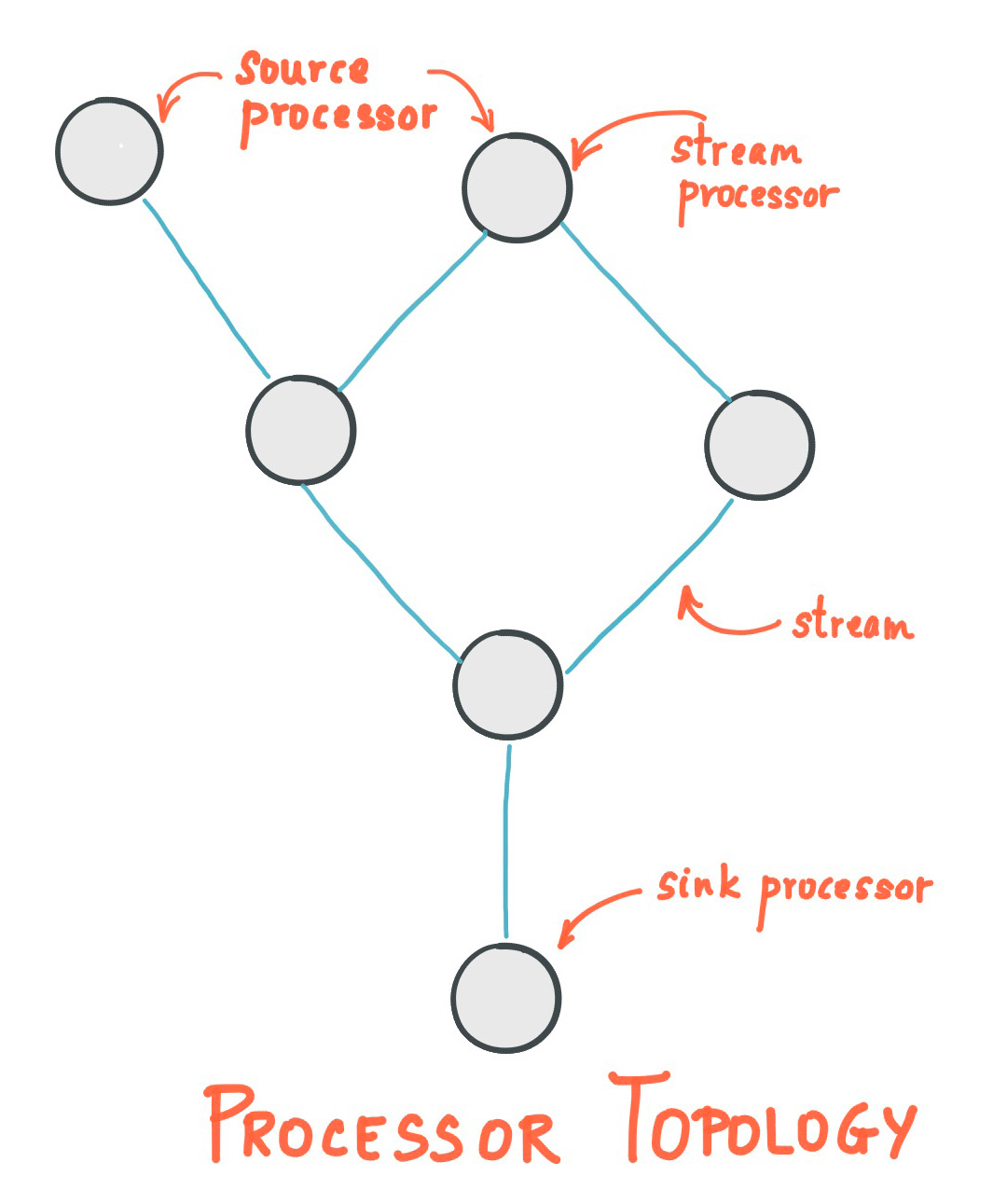
System.out.println(topology.describe());topology 中 processor 有两种比较特殊。
- source processor: 定义了 topology 的入口,即从哪些topic 读取数据
- sink processor: 定义了 topology 的出口,即将最终结果写入哪些 topic
public class App {
    public static void main(String[] args) throws InterruptedException {
        Properties properties = new Properties();
        properties.put(StreamsConfig.APPLICATION_ID_CONFIG, "wordcount-app");
        properties.put(StreamsConfig.BOOTSTRAP_SERVERS_CONFIG, "localhost:9092");
        properties.put(StreamsConfig.DEFAULT_KEY_SERDE_CLASS_CONFIG, Serdes.String().getClass());
        properties.put(StreamsConfig.DEFAULT_VALUE_SERDE_CLASS_CONFIG, Serdes.String().getClass());

        Topology topology = new Topology();
        StoreBuilder<KeyValueStore<String, Long>> countStoreBuilder =
                Stores.keyValueStoreBuilder(
                        Stores.persistentKeyValueStore("counts-store"),
                        Serdes.String(),
                        Serdes.Long()
                );
        // 将状态存储添加到拓扑
        topology.addStateStore(countStoreBuilder);

        // 使用text-lines-topic作为输入源,kafka stream支持定义从多个数据源获取数据
        topology.addSource("Source", "text-lines-topic")
                // processor1: 删除引号
                .addProcessor("removeQuotes", RemoveQuotesProcessor::new,"Source")
                // processor2: 单词统计
                .addProcessor("wordCount", WordCountProcessor::new,"removeQuotes")                 // wordCount需要用到单词计数作为中间状态
                .connectProcessorAndStateStores("wordCount", "counts-store")
                // 将数据输出到streams-wordcount-output中,支持多个topic输出,输出的value是long类型,所以需要指定为LongSerializer()
                .addSink("Sink", "streams-wordcount-output", new StringSerializer(), new LongSerializer(), "wordCount");
        System.out.println(topology.describe());

        KafkaStreams kafkaStreams = new KafkaStreams(topology, properties);
        kafkaStreams.setUncaughtExceptionHandler((Thread thread, Throwable throwable) -> {
            System.err.println("Uncaught exception in thread " + thread + ": " + throwable);
            throwable.printStackTrace();
        });

        kafkaStreams.setStateListener((newState, oldState) -> {
            System.out.println("State changed from " + oldState + " to " + newState);
        });

        kafkaStreams.start();
    }

    static class RemoveQuotesProcessor implements Processor<String, String, String, String> {

        /**
         * 泛型1:当前processor处理后输出的key的类型
         * 泛型2:当前processor处理后输出的value的类型
         */
        private ProcessorContext<String, String> context;

        /**
         * 只调用一次,在处理器开始处理数据之前被调用,用于初始化处理器。
         * 1. 获取和存储 ProcessorContext。
         * 2. 初始化任何需要的资源,如状态存储。
         * 3. 设置定时器或调度定期操作
         */
        @Override
        public void init(ProcessorContext<String, String> context) {
            this.context = context;
        }

        @Override
        public void process(Record<String, String> record) {
            String replace = record.value().replace("\"", "");
            // 创建新的记录,并保留原始记录的时间戳
            context.forward(record.withValue(replace));
        }

        @Override
        public void close() {
            Processor.super.close();
        }
    }

    static class WordCountProcessor implements Processor<String, String, String, Long> {

        private ProcessorContext<String, Long> context;
        private KeyValueStore<String, Long> kvStore;

        @Override
        public void init(ProcessorContext<String, Long> context) {
            this.context = context;
            // 初始化计数器,用于存储中间计算状态,以便进行流式计算
            this.kvStore = context.getStateStore("counts-store");
        }

        @Override
        public void process(Record<String, String> record) {
            String[] words = record.value().toLowerCase().split("\\W+");
            for (String word : words) {
                Long count = kvStore.get(word);
                if (count == null) {
                    kvStore.put(word, 1L);
                    context.forward(new Record<>(word, 1L, record.timestamp()));
                } else {
                    kvStore.put(word, count + 1);
                    context.forward(new Record<>(word, count + 1, record.timestamp()));
                }
            }
        }
    }
}
打印出来的topology如下:
Topologies:
   Sub-topology: 0
    Source: Source (topics: [text-lines-topic])
      --> removeQuotes
    Processor: removeQuotes (stores: [])
      --> wordCount
      <-- Source
    Processor: wordCount (stores: [counts-store])
      --> Sink
      <-- removeQuotes
    Sink: Sink (topic: streams-wordcount-output)
      <-- wordCount
2.6. 时间
time是kafka streams中一个非常重要的概念,下文基于窗口的处理操作也依赖时间定义来划分边界。kakfa streams分为3种时间定义:
- Event time: 事件真实发生的时间,在写入kafka时可以指定 timestamp来表述该时间。如果事件是汽车GPS传感器报告的地理位置变化,则相关的事件时间就是GPS传感器捕获位置变化的时间。
- Processing time:日志在kafka streams任务中处理时的时间,即记录被消费的时间。处理时间可能比原始事件时间晚几毫秒、几小时或几天等。想象一个分析平台,它读取和处理来自汽车传感器的地理位置数据,并将其呈现在车队管理仪表板上。在这里,分析应用程序的处理时间可能比事件时间晚几毫秒或几秒(例如,基于Apache Kafka和Kafka Streams的实时管道),或者晚几小时(例如,基于Apache Hadoop或Apache Spark的批处理管道)。
- Ingestion time:记录日志被写进kafka的topic的时间。与事件时间的区别在于,这个摄入时间戳是在Kafka broker将记录追加到目标topic时生成的,而不是在"源头"创建记录时生成的。与处理时间的区别在于,处理时间是流处理应用程序处理记录的时间。例如,如果一个记录从未被处理,它就没有处理时间的概念,但它仍然有摄入时间。
事件时间和摄入时间之间的选择实际上是通过Kafka的配置来完成的(而不是Kafka Streams)。从Kafka 0.10.x开始,时间戳会自动嵌入到Kafka消息中。根据Kafka的配置,这些时间戳代表事件时间或摄入时间。相应的Kafka配置设置可以在broker级别或每个topic上指定。Kafka Streams中的默认时间戳提取器将按原样检索这些嵌入的时间戳。因此,应用程序的有效时间语义取决于这些嵌入时间戳的Kafka配置。
Kafka Streams通过TimestampExtractor接口为每个数据记录分配一个时间戳。每条记录的时间戳描述了流在时间方面的进展,并被诸如窗口操作等依赖时间的操作所使用。因此,这个时间只有在新记录到达处理器时才会前进。我们将这种数据驱动的时间称为应用程序的stream time,以区别于应用程序实际执行时的wall-clock time。TimestampExtractor接口的具体实现将为stream time定义提供不同的语义。例如,基于数据记录的实际内容(如嵌入的时间戳字段)检索或计算时间戳,以提供事件时间语义,而返回当前wall-clock time则为stream time提供处理时间语义。因此,开发人员可以根据其业务需求强制执行不同的时间概念。
最后,当Kafka Streams应用程序向Kafka写入记录时,它也会为这些新记录分配时间戳。时间戳的分配方式取决于上下文:
- 当通过处理某些输入记录生成新的输出记录时,例如在process()函数调用中触发的context.forward(),输出记录时间戳直接继承自输入记录时间戳。
- 当通过周期性函数(如Punctuator#punctuate())生成新的输出记录时,输出记录时间戳被定义为流任务的当前内部时间(通过context.timestamp()获得)。
- 对于聚合操作,结果更新记录的时间戳将是所有贡献到结果的输入记录的最大时间戳。
也可以在Processor API中通过在调用#forward()时显式地为输出记录分配时间戳来改变默认行为。
对于聚合和连接操作,时间戳的计算遵循以下规则:
- 对于具有左右输入记录的连接操作(stream-stream, table-table),输出记录的时间戳被分配为max(left.ts, right.ts)。
- 对于stream-table连接,输出记录被分配来自流记录的时间戳。
- 对于聚合操作,Kafka Streams还会计算所有记录的最大时间戳,按键计算,可以是全局的(对于非窗口化操作)或每个窗口的。
- 对于无状态操作,输入记录时间戳被直接传递。对于flatMap及其兄弟操作(发出多个记录),所有输出记录都继承自相应输入记录的时间戳。
2.7. 窗口
kafka Streams窗口默认是键控窗口(每个key有独立窗口维护)。在Kafka Streams中,时间窗口操作通常是在分组(grouped)或者已分组(keyed)的流上进行的,每个不同的 key 都有其独立的时间窗口集合。这意味着相同key的消息会被聚合到同一个窗口中,而不同key的消息则分别进入各自的窗口。
好处:
- 这种设计允许并行处理不同 key 的数据。
- 可以独立地对每个 key 进行聚合、计数或其他窗口操作。
假设您在处理用户点击数据,key 是用户 ID。每个用户(每个 key)都会有自己的一组时间窗口,用于统计该用户在不同时间段的点击次数。我们也可以通过一些方案可以实现非键控窗口(全局窗口),例如:
KStream<String, Long> input = ...;

KTable<Windowed<String>, Long> windowedCounts = input
    .selectKey((k, v) -> "global")  // 将所有消息分配到同一个 key
    .groupByKey()
    .windowedBy(TimeWindows.of(Duration.ofMinutes(5)))
    .count();
kafka streams的DSL提供了多种时间窗口
| 窗口类型 | 表现 | 描述 |
|---|---|---|
| Hopping time window | 基于时间 | 大小固定、重叠的窗口 |
| Tumbling time window | 基于时间 | 大小固定、不重叠的窗口 |
| Sliding time window | 基于时间 | 大小固定,重叠的窗口,仅用于join计算的窗口 |
| Session window | 基于session | 大小不固定、不重叠的、基于数据驱动的窗口 |
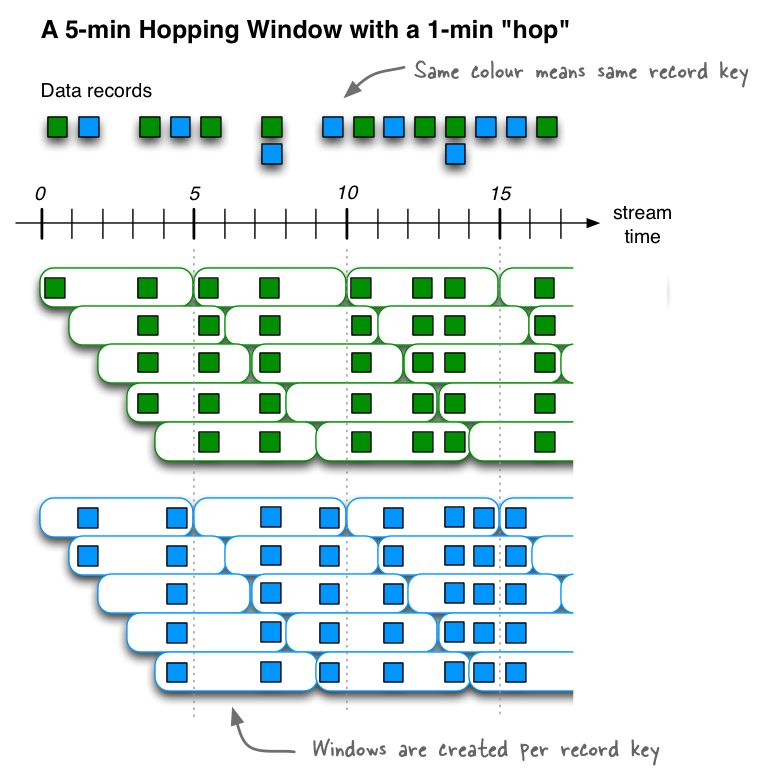
2.7.1. hopping time window
定义一个大小为5分钟、间隔为1分钟的Hopping time window。kafka窗口采用左闭右开原则,即窗口是[0,5),[5,10),[10,15)....
// A hopping time window with a size of 5 minutes and an advance interval of 1 minute.
Duration windowSize = Duration.ofMinutes(5);
Duration advance = Duration.ofMinutes(1);
TimeWindows.ofSizeWithNoGrace(windowSize).advanceBy(advance);
2.7.2. Tumbling time window
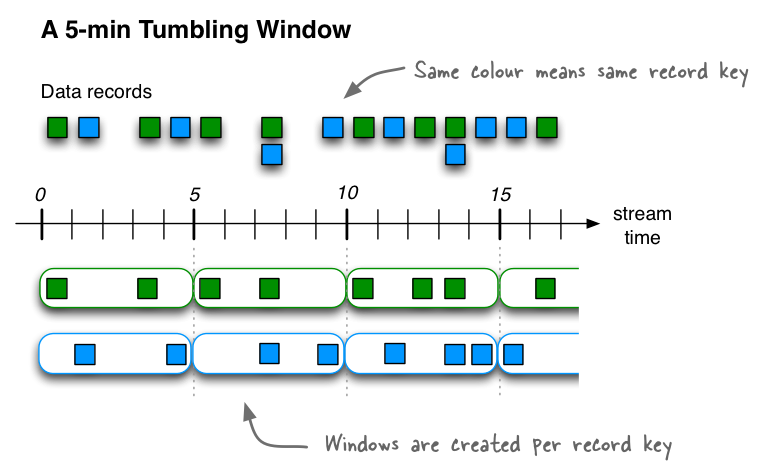
Tumbling time window是hopping time window的一种特例,即windows和interval一样大。这种窗口相互之间不会重叠,可以保证一个记录只会属于一个窗口。kafka窗口采用左闭右开原则,定义一个大小为5分钟的Tumbling time window,[0,5),[5,10),[10,15)....
// A tumbling time window with a size of 5 minutes (and, by definition, an implicit
// advance interval of 5 minutes), and grace period of 1 minute.
Duration windowSize = Duration.ofMinutes(5);
Duration gracePeriod = Duration.ofMinutes(1);
TimeWindows.ofSizeAndGrace(windowSize, gracePeriod);

// The above is equivalent to the following code:
TimeWindows.ofSizeAndGrace(windowSize, gracePeriod).advanceBy(windowSize);
The grace period to admit out-of-order events to a window. Must be non-negative. 是一个窗口在其原定结束时间后,额外等待迟到数据的时间段。它允许在窗口结束后的一段时间内继续接受和处理迟到的数据,而不会立即关闭窗口。
以下代码,每隔10秒对当前窗口内的单词数量进行计数。
public static void main(String[] args) throws InterruptedException {
    Properties properties = new Properties();
    properties.put(StreamsConfig.APPLICATION_ID_CONFIG, "wordcount-app");
    properties.put(StreamsConfig.BOOTSTRAP_SERVERS_CONFIG, "localhost:9092");
    properties.put(StreamsConfig.DEFAULT_KEY_SERDE_CLASS_CONFIG, Serdes.String().getClass());
    properties.put(StreamsConfig.DEFAULT_VALUE_SERDE_CLASS_CONFIG, Serdes.String().getClass());

    StreamsBuilder builder = new StreamsBuilder();
    builder.stream("text-lines-topic", Consumed.with(Serdes.String(), Serdes.String()))
            .map((key, value) -> new KeyValue<>(key, value.replace("\"", "")))
            .flatMapValues((key, textLine) -> Arrays.asList(textLine.toLowerCase().split("\\W+")))
            .groupBy((key, word) -> word)
            .windowedBy(TimeWindows.ofSizeAndGrace(Duration.ofSeconds(10), Duration.ofSeconds(2)))
            .count()
            .toStream()
            .map((key, value) -> new KeyValue<>(key.key(), value))
            .to("streams-wordcount-output", Produced.with(Serdes.String(), Serdes.Long()));

    KafkaStreams kafkaStreams = new KafkaStreams(builder.build(), properties);
    kafkaStreams.setUncaughtExceptionHandler((Thread thread, Throwable throwable) -> {
        System.err.println("Uncaught exception in thread " + thread + ": " + throwable);
        throwable.printStackTrace();
    });

    kafkaStreams.setStateListener((newState, oldState) -> {
        System.out.println("State changed from " + oldState + " to " + newState);
    });

    kafkaStreams.start();
}
2.7.3. slide time window
3. docker安装kafka测试
# zookeeper
docker run -d --name zookeeper -p 2181:2181 -t wurstmeister/zookeeper
# kafka, docker inspect查看zookeeper地址并配置
docker run -d --name kafka -p 9092:9092 -e KAFKA_BROKER_ID=0 -e KAFKA_ZOOKEEPER_CONNECT=172.17.0.2:2181 -e KAFKA_ADVERTISED_LISTENERS=PLAINTEXT://localhost:9092 -e KAFKA_LISTENERS=PLAINTEXT://0.0.0.0:9092 wurstmeister/kafka
进入kafka容器后,创建topic
/opt/kafka_2.13-2.8.1/bin/kafka-topics.sh --bootstrap-server localhost:9092 --create --topic text-lines-topic --partitions 1 --replication-factor 1
运行以下代码,进行流式计算,单词统计
public class App {
    public static void main(String[] args) {
        Properties properties = new Properties();
        properties.put(StreamsConfig.APPLICATION_ID_CONFIG, "wordcount-app");
        properties.put(StreamsConfig.BOOTSTRAP_SERVERS_CONFIG, "localhost:9092");
        properties.put(StreamsConfig.DEFAULT_KEY_SERDE_CLASS_CONFIG, Serdes.String().getClass());
        properties.put(StreamsConfig.DEFAULT_VALUE_SERDE_CLASS_CONFIG, Serdes.String().getClass());

        StreamsBuilder builder = new StreamsBuilder();
        builder
                // 使用topic text-lines-topic作为输入源
                .<String, String>stream("text-lines-topic")
                // 将每个小时转换为单词列表
                    .flatMapValues(textLine -> Arrays.asList(textLine.toLowerCase().split("\\W+")))
                // 按照单词分组
                .groupBy((key, word) -> word)
                // 1. 对每个单词计数
                // 2. 将KTable持久化到一个名为"counts-store"的状态存储中(默认使用RocksDB)
                .count(Materialized.as("counts-store"))
                // 将技术结果输出到topic streams-wordcount-output中
                .toStream().to("streams-wordcount-output", Produced.with(Serdes.String(), Serdes.Long()));

        Topology topology = builder.build();
        KafkaStreams streams = new KafkaStreams(topology, properties);
        streams.start();
    }
}
生产消息
/opt/kafka_2.13-2.8.1/bin/kafka-console-producer.sh --bootstrap-server localhost:9092 --topic text-lines-topic
>good good study
>day day up
>good good study
>day day up
>good good study
>day day up
>good good study
>day day up up
消费者
/opt/kafka_2.13-2.8.1/bin/kafka-console-consumer.sh --bootstrap-server localhost:9092 --topic streams-wordcount-output --from-beginning --formatter kafka.tools.DefaultMessageFormatter --property print.key=true --property print.value=true --property key.deserializer=org.apache.kafka.common.serialization.StringDeserializer --property value.deserializer=org.apache.kafka.common.serialization.LongDeserializer
# 输出
good	6
study	3
day	6
up	3
good	8
study	4
day	8
up	5
输出是一个连续的,不断被更新的流
将应用重启后,producer生产新消息good good study,会发现下游topic中计数会更新
good    10
study	5
/opt/kafka_2.13-2.8.1/bin/kafka-topics.sh --bootstrap-server localhost:9092 --list
# 输出
/opt/kafka_2.13-2.8.1/bin/kafka-topics.sh --bootstrap-server localhost:9092 --list
__consumer_offsets
streams-wordcount-output
text-lines-topic
wordcount-app-KSTREAM-AGGREGATE-STATE-STORE-0000000004-changelog
wordcount-app-KSTREAM-AGGREGATE-STATE-STORE-0000000004-repartition
wordcount-app-counts-store-changelog
wordcount-app-counts-store-repartition
评论