1. MCP Server开发
1.1. 注意事项
- 使用stdio作为transport layer的时候,不要进行任何控制台输出
1.2. 交互过程
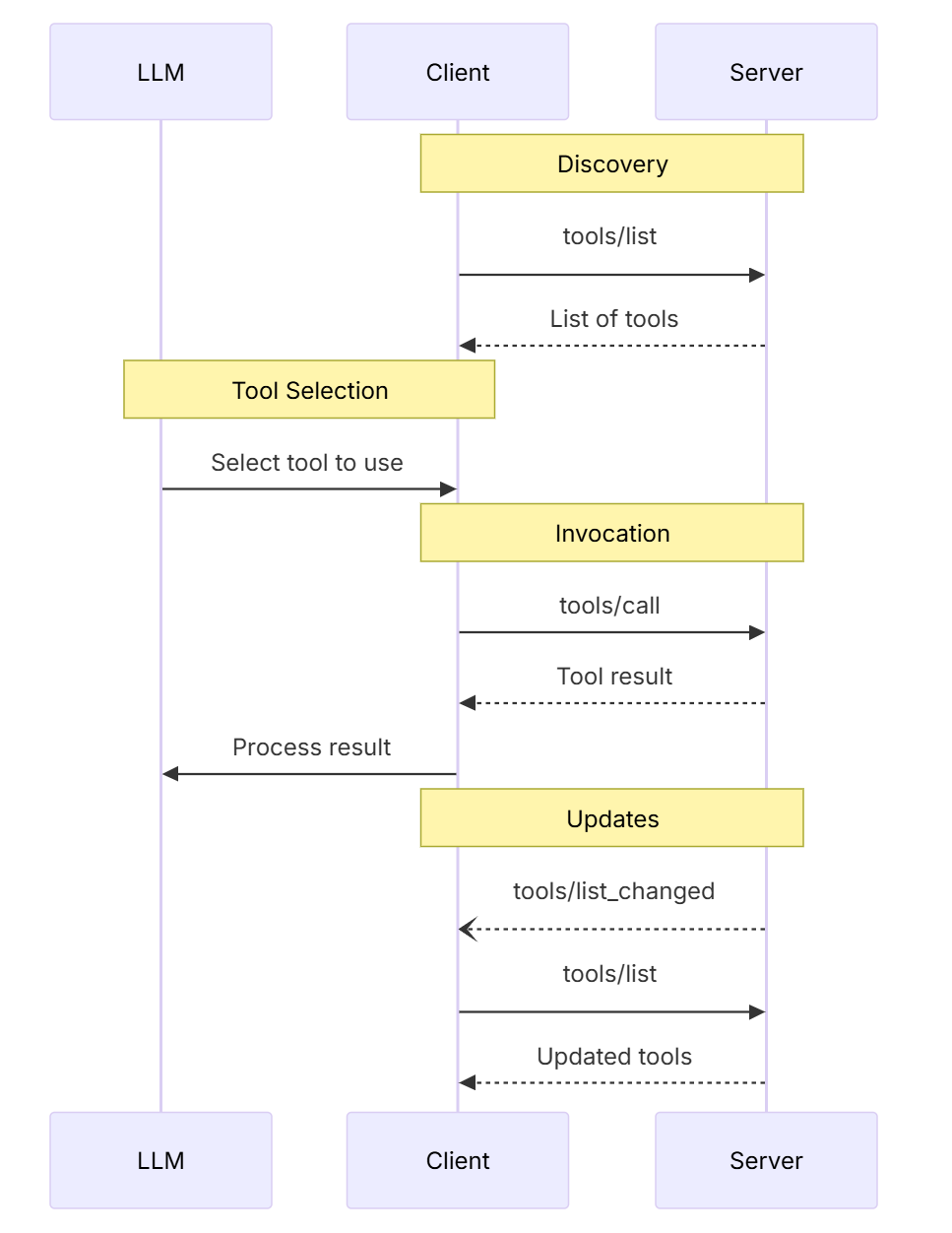
INITIALIZE = "initialize"
- 协商协议版本
- primitives支持情况,如tools、resources、prompts等features
- 是否支持notifications
LIST_TOOLS = "tools/list"
- 用于获取可用工具的列表
- 客户端调用此方法来发现服务端提供了哪些工具
- 返回工具的名称、描述、参数定义等元数据信息
CALL_TOOL = "tools/call"
- 执行具体的工具调用
- 客户端通过此方法调用特定工具,传递必要的参数
- 服务端执行工具逻辑并返回结果
PING = "ping"
- 连接保活和健康检查
- 用于测试连接是否正常,服务端是否响应
- 通常返回简单的确认消息
这些方法构成了MCP协议的基础通信框架,使得AI模型能够动态发现和调用外部工具,实现功能扩展。典型的交互流程是:初始化 → 列出工具 → 调用工具,期间穿插ping检查连接状态,更多信息可以参考https://modelcontextprotocol.io/docs/learn/architecture
1.3. 标准错误码
enum ErrorCode {
  // Standard JSON-RPC error codes
  ParseError = -32700,
  InvalidRequest = -32600,
  MethodNotFound = -32601,
  InvalidParams = -32602,
  InternalError = -32603,
}
SDKs and applications can define their own error codes above -32000.
1.4. tools发现
tool/list的响应需要包含以下关键部分
name: A unique identifier for the tool within the server’s namespace. This serves as the primary key for tool execution and should be URI-like for better namespacing (e.g.,com.example.calculator/arithmeticrather than justcalculate)title: A human-readable display name for the tool that clients can show to usersdescription: Detailed explanation of what the tool does and when to use itinputSchema: A JSON Schema that defines the expected input parameters, enabling type validation and providing clear documentation about required and optional parameters
AI应用从所有已连接的MCP服务器中获取可用工具,并将它们整合到一个统一的工具注册表中,供语言模型访问。这使得大语言模型(LLM)能够了解自己可以执行哪些操作,并在对话过程中自动生成相应的工具调用指令。
# Pseudo-code using MCP Python SDK patterns
available_tools = []
for session in app.mcp_server_sessions():
    tools_response = await session.list_tools()
    available_tools.extend(tools_response.tools)
conversation.register_available_tools(available_tools)
1.5. 官方weather示例
1.5.1. 辅助函数
- 调用天气API接口
- 格式化alert输出
async def make_nws_request(url: str) -> dict[str, Any] | None:
    """Make a request to the NWS API with proper error handling."""
    headers = {
        "User-Agent": USER_AGENT,
        "Accept": "application/geo+json"
    }
    async with httpx.AsyncClient() as client:
        try:
            response = await client.get(url, headers=headers, timeout=30.0)
            response.raise_for_status()
            return response.json()
        except Exception:
            return None

def format_alert(feature: dict) -> str:
    """Format an alert feature into a readable string."""
    props = feature["properties"]
    return f"""
Event: {props.get('event', 'Unknown')}
Area: {props.get('areaDesc', 'Unknown')}
Severity: {props.get('severity', 'Unknown')}
Description: {props.get('description', 'No description available')}
Instructions: {props.get('instruction', 'No specific instructions provided')}
"""
1.5.2. tools实现
@mcp.tool()
async def get_alerts(state: str) -> str:
    """Get weather alerts for a US state.

    Args:
        state: Two-letter US state code (e.g. CA, NY)
    """
    url = f"{NWS_API_BASE}/alerts/active/area/{state}"
    data = await make_nws_request(url)

    if not data or "features" not in data:
        return "Unable to fetch alerts or no alerts found."

    if not data["features"]:
        return "No active alerts for this state."

    alerts = [format_alert(feature) for feature in data["features"]]
    return "\n---\n".join(alerts)

@mcp.tool()
async def get_forecast(latitude: float, longitude: float) -> str:
    """Get weather forecast for a location.

    Args:
        latitude: Latitude of the location
        longitude: Longitude of the location
    """
    # First get the forecast grid endpoint
    points_url = f"{NWS_API_BASE}/points/{latitude},{longitude}"
    points_data = await make_nws_request(points_url)

    if not points_data:
        return "Unable to fetch forecast data for this location."

    # Get the forecast URL from the points response
    forecast_url = points_data["properties"]["forecast"]
    forecast_data = await make_nws_request(forecast_url)

    if not forecast_data:
        return "Unable to fetch detailed forecast."

    # Format the periods into a readable forecast
    periods = forecast_data["properties"]["periods"]
    forecasts = []
    for period in periods[:5]:  # Only show next 5 periods
        forecast = f"""
{period['name']}:
Temperature: {period['temperature']}°{period['temperatureUnit']}
Wind: {period['windSpeed']} {period['windDirection']}
Forecast: {period['detailedForecast']}
"""
        forecasts.append(forecast)

    return "\n---\n".join(forecasts)
1.5.3. mcp配置
{
  "mcpServers": {
    "weather": {
      "command": "uv",
      "args": [
        "--directory",
        "D:\\workspace\\proj\\weather",
        "run",
        "weather.py"
      ]
    }
  }
}
1.6. 交互过程
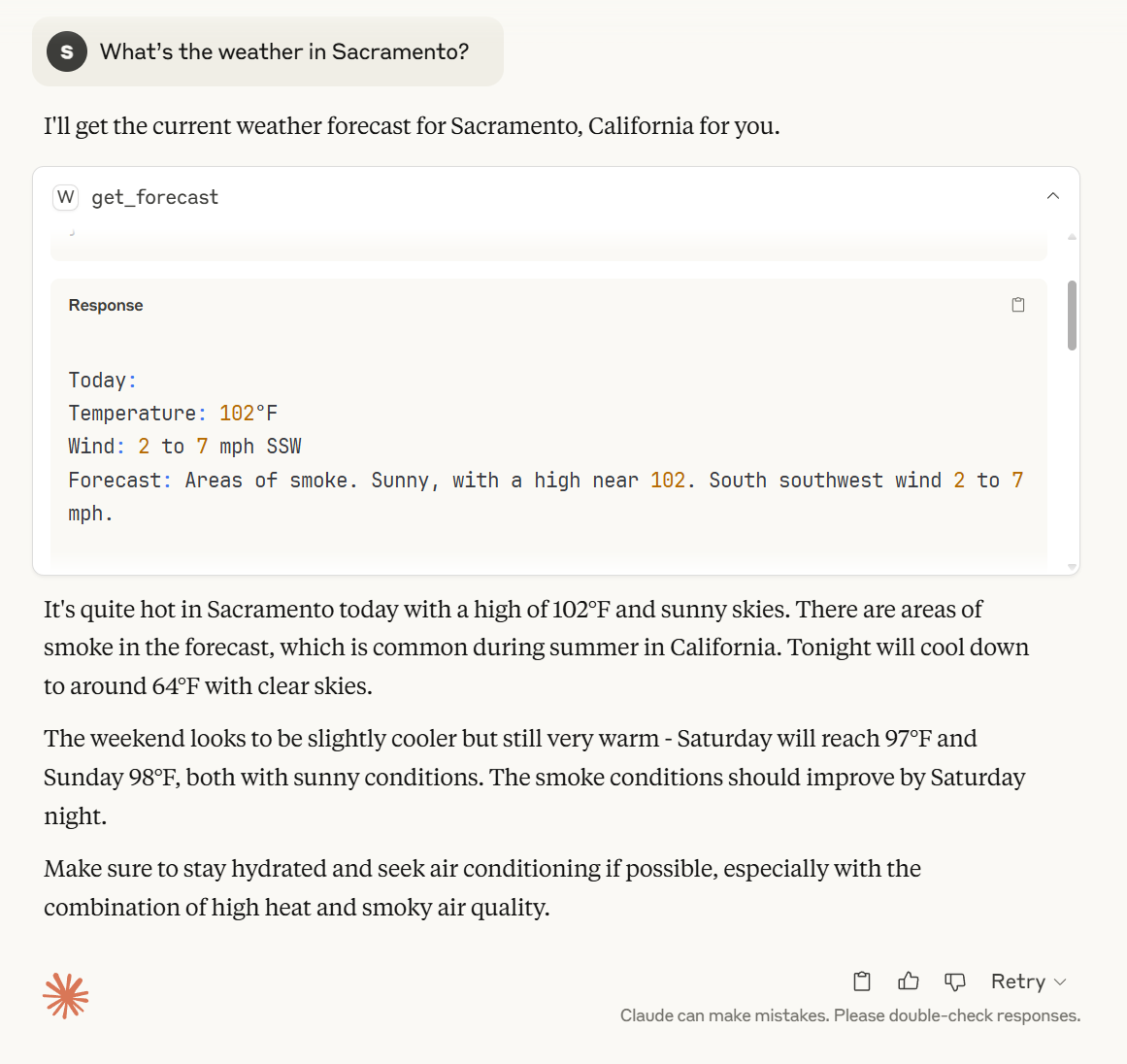
- The client(Claude desktop) sends your question to Claude
- Claude analyzes the available tools and decides which one(s) to use
- The client executes the chosen tool(s) through the MCP server
- The results are sent back to Claude
- Claude formulates a natural language response
- The response is displayed to you!
2. MCP Client开发
2.1. 官网client示例
2.2. 交互过程
- The client gets the list of available tools from the server
- Your query is sent to Claude along with tool descriptions
- Claude decides which tools (if any) to use
- The client executes any requested tool calls through the server
- Results are sent back to Claude
- Claude provides a natural language response
- The response is displayed to you
评论